> For the complete documentation index, see [llms.txt](https://help.guestreply.ai/llms.txt). Markdown versions of documentation pages are available by appending `.md` to page URLs; this page is available as [Markdown](https://help.guestreply.ai/readme/user-manual/inbox/priorities.md).
# Priorities
Priorities allow you to categorize and filter guest conversations based on urgency. The AI Agent automatically detects message content and assigns appropriate priority levels, helping you quickly identify which conversations need immediate attention versus those that can wait.
**Important:** Priorities do not trigger notifications. They are designed as a filtering and organization tool to help you prioritize messages within your Inbox.
### Priority Levels
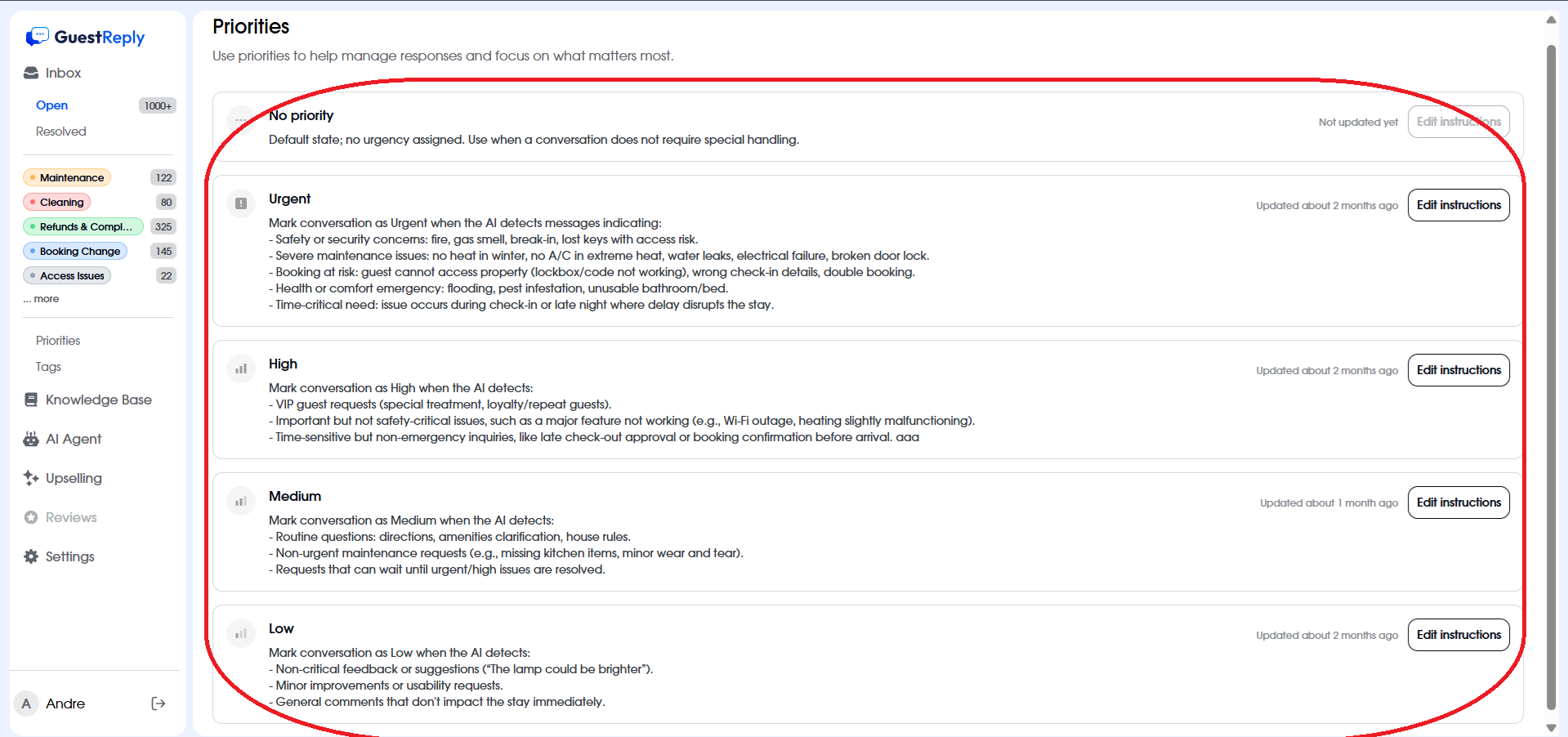
GuestReply organizes conversations into five priority levels:
1. **No Priority**\
Default; no urgency. Assigned to routine messages.
2. **Urgent 🔴**\
Immediate attention needed: safety concerns, severe maintenance, access issues, or emergencies during check-in/late night.
3. **High 🟠**\
Important but not critical: VIP guest requests, major but non-urgent issues, or time-sensitive inquiries.
4. **Medium 🟡**\
Standard inquiries: routine questions, non-urgent maintenance, or requests that can wait.
5. **Low 🟢**\
Non-time-sensitive feedback or suggestions.
### How to Use Priorities
#### Filtering by Priority
1. Navigate to your **Inbox**
2. Click the **Filter** icon
3. Select the priority level(s) you want to view:
* Any priority (default - shows all)
* No priority
* Urgent
* High
* Medium
* Low
4. Click **Apply filters**
This allows you to focus on urgent matters first, then work your way through lower-priority conversations.
#### Customizing Priority Instructions
You can customize how the AI Agent categorizes messages by editing the instructions for each priority level:
1. Navigate to **Priorities** and select the priority level you want to customize
2. Click **Edit instructions**
3. Modify the instructions to match your specific needs
4. Save changes
### Manually Adjusting Priority
While the AI automatically assigns priorities based on message content, you can manually override the priority level when needed.
#### How to Manually Set Priority
1. Open the conversation you want to reprioritize
2. Click on the **Priority** button
3. Select the appropriate priority level
4. The new priority is applied immediately
---
# Agent Instructions
This documentation is published with GitBook. GitBook is the documentation platform designed so that both humans and AI agents can read, navigate, and reason over technical content effectively. Learn more at gitbook.com.
## Querying This Documentation
If you need additional information that is not directly available in this page, you can query the documentation dynamically by asking a question.
Perform an HTTP GET request on the current page URL with the `ask` query parameter, and the optional `goal` query parameter:
```
GET https://help.guestreply.ai/readme/user-manual/inbox/priorities.md?ask=&goal=
```
`ask` is the immediate question: it should be specific, self-contained, and written in natural language.
`goal` is optional and describes the broader end goal you are ultimately trying to accomplish on behalf of the user. GitBook uses it to tailor the answer towards what is most useful for that goal.
The response will contain a direct answer to the question and relevant excerpts and sources from the documentation.
Use this mechanism when the answer is not explicitly present in the current page, you need clarification or additional context, or you want to retrieve related documentation sections.